Staff Planning
Goal of the project
For a private household we developed a multifunctional staff-planning software. The goal of the project was to support and schedule the household’s employees digitally. The central software was also meant to enable task and appointment planning as well as communication. Recurring costs for the household were to be avoided, as were major IT investments.
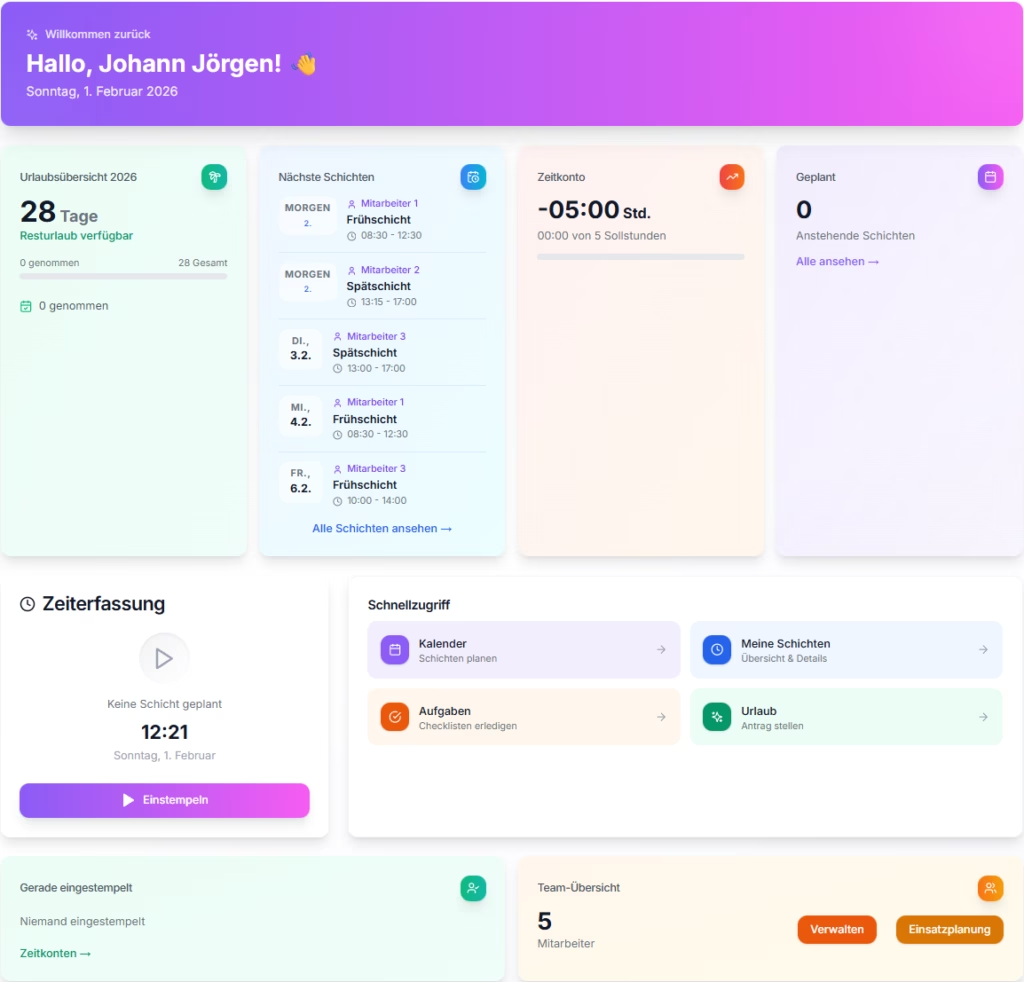
Time tracking and scheduling for your team — simple, clear, privacy-compliant. If you employ staff as a private household, you need planning, time tracking and documentation — without complicated enterprise software. Staff Planning was built for exactly that.
As a private household with employees, you know the routine: shifts have to be planned, working hours recorded and leave coordinated. Spreadsheets become unwieldy, paper timesheets get lost and require 100% manual effort, and the necessary transparency for payroll is often missing. Staff Planning from Schübeler Consulting helps you with all of this — in a single, easy-to-use application: from planning to the finished monthly report.
What Staff Planning does for you:
Everything in one app — planning, time tracking, documentation. Staff Planning is web-based software for private households and small companies that employ staff. With it you can:
- Plan shifts – scheduling in the calendar, with day, week and month views
- Record working hours – clock in and out, breaks, automatic functions
- Manage leave and sickness – requests, approvals, overviews
- Create reports – PDF export for payroll and records
- Coordinate your team – tasks, chat, notifications
The application is built with GDPR in mind, can run on your own hardware (for example locally or on a NAS) and also works on mobile.
Who is Staff Planning for?
The software is aimed at:
- Families and private households with employees
- Small teams and start-ups
- Small and mid-sized companies that schedule staff in shifts
You take on the role of the employer — Staff Planning helps you keep track and maintain records.
Features at a glance
For employees
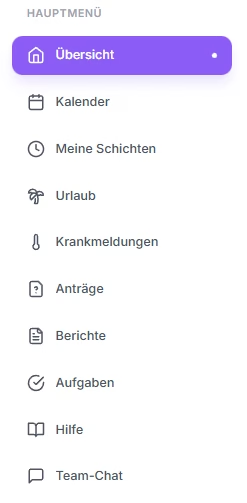
| Overview | A clear start page with all the important information at a glance. Clock in and out, breaks, shift overview |
| Calendar | The calendar keeps all of your own appointments in view at any time and can be synced with your smartphone calendar |
| My shifts | View and edit your own shifts |
| Leave, sickness, requests | Request leave, report sickness, ask for a shift swap, check the status |
| Tasks | Work through daily checklists |
| Help | A comprehensive help system that explains all the important functions in detail. |
| Team chat | Quick coordination with the management and the team |
For management
| Function | Description |
|---|---|
| Scheduling | Create, move and copy the shift plan in the calendar. AutoPlan: a sophisticated logic schedules shifts automatically according to your preferences. |
| Approvals | Review leave requests, change requests and timesheets |
| Time accounts | View working hours and balances per person or for everyone at once — so you immediately see which employees still have capacity, and AutoPlan schedules that capacity automatically on request. |
| Reports | Export monthly overviews as PDF |
| Audit log | Log changes in a traceable way |
| Task management | Create tasks or task templates and decide for yourself which employee should handle them, whether they should restart automatically, and much more. |
For management (family / coordination)
| Function | Description |
|---|---|
| Scheduling | Create, move and copy the shift plan in the calendar |
| Approvals | Review leave requests, change requests and timesheets |
| Time accounts | View working hours and balances per person |
| Reports | Export monthly overviews as PDF |
| Audit log | Log changes in a traceable way |
6. Technical advantages
- Self-hosted: runs on your NAS, locally or on a server — your data stays with you
- Built with GDPR in mind: no data passed on to third parties thanks to a local database
- PWA: use it on smartphone and tablet without an app store
- White-label: logo, colours, app name and company details are customisable
- DATEV-compatible: exports for your tax advisor or accounting
How Staff Planning came about
First, together with the client, we surveyed the market and presented several proposed solutions, which we also built as prototypes. The market does offer software of this kind, but either on a subscription model or with a heavily reduced scope (freemium). These solutions did not cover the family’s individual requirements, because generalised solutions rarely fit well. On top of that, the software was meant to be “extremely stylish”. After this market evaluation it became clear that the family needs and wants an individual approach. So together we designed software that meets all of the family’s requirements — a system that can be run locally and on a NAS, and of course on an external server as well.
The software was developed in close coordination with private households that employ staff. The following principles were applied:
- A pragmatic start – first the most important processes were mapped: shift planning, time tracking, leave requests and simple reports.
- A fast prototype – just a few days after the request we rolled out the first working prototype. The handy “bug reporting function” made it easy to report and work through errors and improvements.
- Iterative expansion – step by step, the functions needed in practice were added: time accounts, approval workflows, audit log, tasks, chat.
- Security and data protection – self-hosting and no dependence on external cloud services for your data. The software does not collect employees’ personal master data. Only the first name, the start date of employment and an email address need to be entered.
- Easy to use – clear roles (admin, management, employee) and a clean interface, even for users who are not very tech-savvy.
- Flexible deployment – run it on a NAS with Docker or locally, so that households and small companies can operate their own instance without major IT effort.
Development is ongoing — with a focus on stability, data protection and usability for private households.